Beta
Thermal Demand Profile Studio
What will this building need from its plant, every hour of the year?
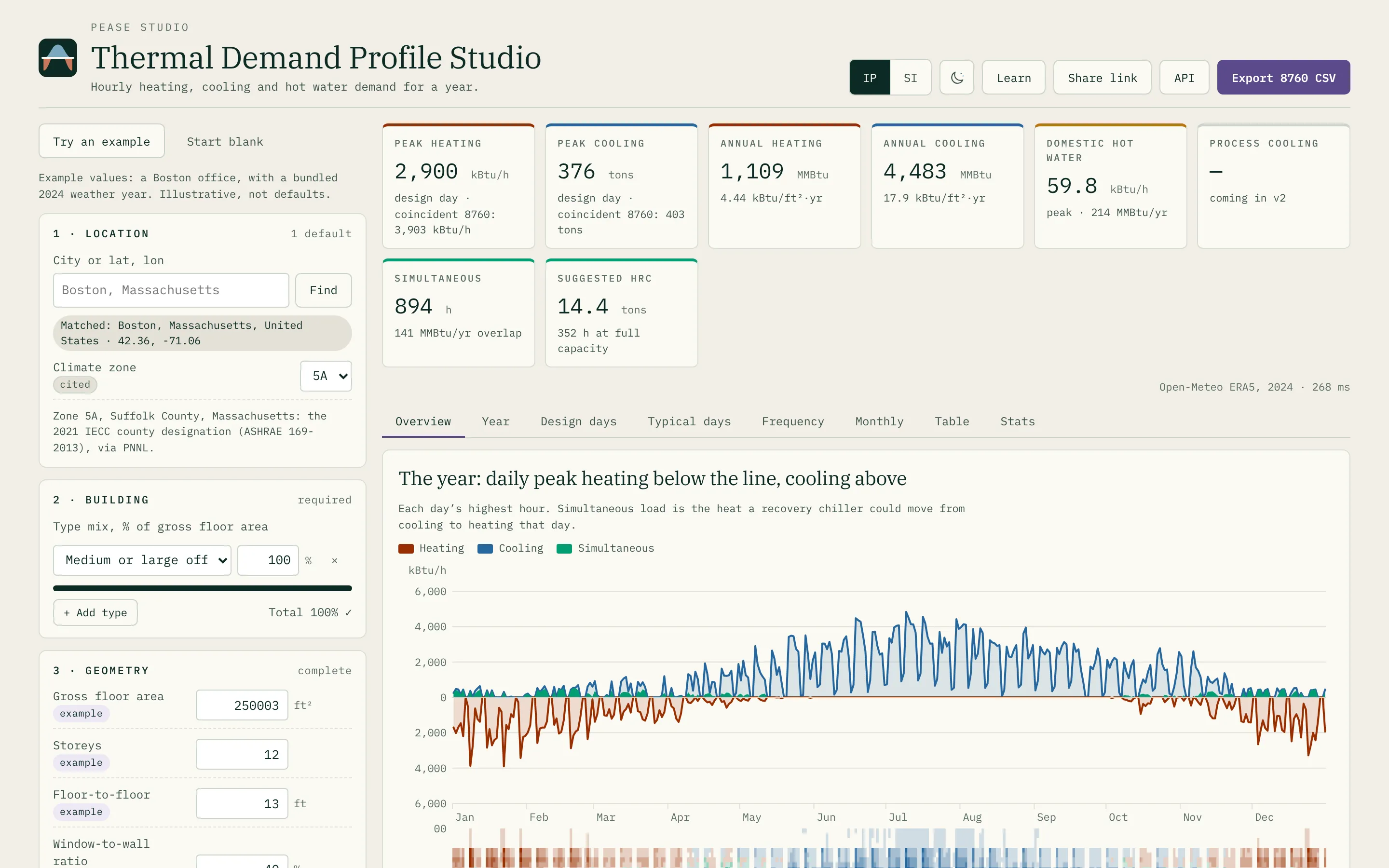
- An hourly year of heating, cooling and hot water, every term labelled
- ASHRAE design days — steady-state heating, RTS cooling
- A five-zone hourly model, the core and a perimeter zone per face
- Load frequency, simultaneous load and heat-recovery chiller sizing
- One to five building types blended onto one envelope
- CSV, REST API and MCP — no account, nothing uploaded
Before there is a model, there is usually a question from the plant room: how big, how often, and at the same time as what? A boiler and a chiller are sized on a peak, but a heat pump, a heat-recovery chiller or a thermal network is sized on the shape — how many hours sit near the peak, and how many hours the building is heating one zone while it cools another.
Thermal Demand Profile Studio answers that from what is known in the first week. A location, a mix of building types, and a few geometry numbers go in; a full year of hourly heating, cooling and hot water comes out, with the design days, typical days, a load-frequency curve and a CSV. It is for energy engineers, modelers and MEP engineers who need a defensible profile before anyone has drawn a floor plate.
Two calculations, one set of inputs
The headline peaks are design-day values, done the way ASHRAE does them: steady-state heat loss at the 99.6% condition for heating, and the Radiant Time Series on the 21st of each month for cooling, using the Handbook’s own response-factor tables.
The year is a separate calculation. ASHRAE is plain that the RTS “should not be used for annual energy simulations”, so the 8,760 hours run on an ISO 13790 5R1C network instead — five zones, the core and a 15 ft perimeter zone on each face, coupled through the air and solved hour by hour. The year’s highest hour is shown too, labelled for what it is: a coincident peak, never the design number.
The two disagree, and the gap is worth reading. On the test office the year’s heating peak sits well above the design day, and every one of those peaks is a Monday morning — the building recovering from a weekend setback, which the steady-state method leaves out by design. Both are shown, side by side.
Every hour is a sum of named parts
No hour is one UA times a temperature difference. Each is a reduction over labelled terms — walls and roof to sol-air, windows, ground, infiltration, ventilation, the outdoor-air coil, sun through glass, people, lighting, equipment, and the exchange between zones — and the stacked charts and the CSV’s component columns sum exactly to the totals.
Outdoor air is treated as a coil load, beside the zones and never netted against them. That is what makes simultaneous heating and cooling real rather than a rounding error: a south zone cooling on a bright March afternoon while the north zone heats. The frequency tab counts those hours and sizes a heat-recovery chiller against them.
Hot water is its own column with its own peak, never folded into space heating.
Every default says where it came from
Pick up to five building types by share of floor area, and the internal gains, schedules, people and hot water arrive with a source on each field — ASHRAE Fundamentals Chapter 18, PNNL’s 90.1-2019 prototype models, national building stock. Type over one and its badge changes to yours. A value that cannot be cited is not filled in: the run waits for it rather than guessing.
Form factor — thermal envelope area over gross floor area — is an input, not a derived wall-to-floor ratio, because it is the one number about massing that is known before the massing is.
Weather, built or brought
Name a place and the tool builds a typical year from ten years of ERA5 hourly
weather via Open-Meteo, choosing months by the ISO 15927-4 method. Or drop in
your own .epw, with a .ddy beside it for the published design conditions;
the file is read in the browser, not uploaded. Where a design value is derived
from the hours rather than published, it says so.
The same engine, three ways
The calculation in the browser is the one behind a REST API and an MCP server, and a test holds their CSVs byte-identical. “Copy this page as an API run” turns whatever is on screen into a request body. The developer page has the fields and the schema.
Why it is a beta
The method is complete and tested against the ASHRAE worked example; the tool is new. It gives an early look at a building’s annual thermal demand profile without a full model — for planning and early sizing. The method, every source and the full list of what it leaves out are on the tool’s Learn panel. If something reads wrong, the source is open and an email is welcome.